GeForce RTX 4090 & GeForce RTX 4070 Ti share many similarities, but there are also important differences, such as quality, performance, features, design, and connectivity. If you want the best one between them, I Would recommend the GeForce RTX 4090 rather than the GeForce RTX 4070 Ti.
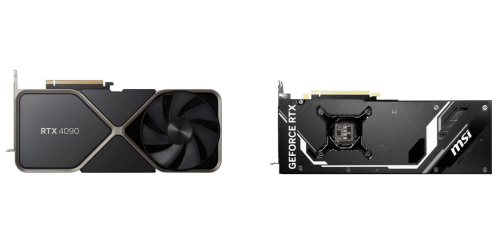
Why Do I Recommend The GeForce RTX 4090?
- The GeForce RTX 4090 has 16384 CUDA cores for significantly higher parallel processing performance in gaming, rendering, and compute-heavy workloads, while the GeForce RTX 4070 Ti has 7680 CUDA cores.
- GeForce RTX 4090 features a 384-bit memory bus for much higher memory throughput when handling 4K textures and large datasets, whereas the GeForce RTX 4070 Ti uses a narrower 192-bit memory bus.
- It comes with 24 GB GDDR6X VRAM for smoother performance in high-resolution gaming and professional applications, while the GeForce RTX 4070 Ti comes with 12 GB GDDR6X VRAM.
- The GeForce RTX 4090 includes 128 third-generation RT cores for faster and more consistent real-time ray tracing performance, whereas the GeForce RTX 4070 Ti includes 60 third-generation RT cores.
- GeForce RTX 4090 features 512 fourth-generation Tensor cores to accelerate AI-driven tasks such as DLSS frame generation and AI workloads more efficiently, while the GeForce RTX 4070 Ti features 240 fourth-generation Tensor cores.
- It has 1008 GB/s memory bandwidth for reduced bottlenecks in bandwidth-intensive gaming and creative workflows, while the GeForce RTX 4070 Ti has 504 GB/s memory bandwidth.
- The GeForce RTX 4090 uses the larger AD102 GPU die for sustained high-end performance under heavy loads, whereas the GeForce RTX 4070 Ti uses the smaller AD104 GPU die.
- GeForce RTX 4090 supports a higher power limit for maintaining peak performance during long gaming or rendering sessions, while the GeForce RTX 4070 Ti operates at a lower power limit that prioritizes efficiency over maximum output.
Maybe the GeForce RTX 4070 Ti can make you comfortable because it’s a little bit cheaper than the GeForce RTX 4090. But you have to compromise all the above-mentioned features. Now the Decision is Yours. I hope it was helpful to choose the right one.
Side-by-Side Comparison
| Feature | GeForce RTX 4090 | GeForce RTX 4070 Ti |
| CUDA Cores | 16384 | 7680 |
| Tensor Cores | 512 | 240 |
| RT Cores | 128 | 60 |
| VRAM Capacity | 24 GB | 12 GB |
| Memory Bus Width | 384-bit | 192-bit |
| Memory Bandwidth | 1008 GB/s | 504 GB/s |
| L2 Cache | 72 MB | 48 MB |
| Transistor Count | 76.3B | 35.8B |
| Die Size | 608 mm² | 295 mm² |
| Typical Board Power | 450 W | 285 W |
| Recommended PSU | 850 W | 700 W |
| Price | Check GeForce RTX 4090 Price | Check GeForce RTX 4070 Ti Price |
What Common Both Can Do?
- GPU Architecture: Both graphics cards are based on the Ada Lovelace architecture, which introduces major efficiency and performance improvements over previous generations. This architecture enables advanced features such as DLSS 3 and improved ray tracing performance.
- Manufacturing Node: Each GPU is manufactured using TSMC’s 4N process, allowing for higher transistor density and improved power efficiency. This helps both cards deliver strong performance per watt compared to older nodes.
- Ray Tracing Support: Both models support hardware-accelerated ray tracing, enabling realistic lighting, shadows, and reflections in supported games. This feature enhances visual fidelity in modern AAA titles.
- DLSS Support: GeForce RTX 4090 and GeForce RTX 4070 Ti both support DLSS 3 technology, including frame generation. This allows games to achieve higher frame rates while maintaining image quality.
- Shader Model: Both GPUs support Shader Model 6.7, ensuring compatibility with modern rendering techniques and game engines. This allows developers to use advanced shading features consistently across both cards.
- DirectX Support: Each card supports DirectX 12 Ultimate, providing access to features like ray tracing, mesh shaders, and variable rate shading. This ensures full compatibility with current and upcoming PC games.
- Vulkan Support: Both GPUs support Vulkan 1.3, offering low-level API access for efficient cross-platform graphics and compute workloads. This is especially relevant for modern game engines and professional applications.
- PCIe Interface: Both graphics cards use a PCIe 4.0 x16 interface, providing sufficient bandwidth for gaming and content creation workloads. This ensures compatibility with modern motherboards.
- Memory Type: Each model uses GDDR6X memory, delivering high data transfer rates for demanding graphics tasks. This memory type supports high-resolution gaming and heavy texture workloads.
- HDMI Standard: Both cards include HDMI 2.1a support, enabling high refresh rate gaming at 4K and 8K resolutions. This is useful for modern TVs and high-end monitors.
- DisplayPort Standard: DisplayPort 1.4a is supported on both GPUs, allowing for high-resolution, high-refresh-rate monitor setups. This ensures broad display compatibility.
- AV1 Encode Support: Both GPUs support AV1 encoding, enabling efficient video streaming and content creation with reduced file sizes. This is valuable for streamers and video creators.
- AV1 Decode Support: Each card includes AV1 decoding capabilities, allowing smooth playback of next-generation video formats. This improves efficiency when watching high-quality streamed content.
- NVENC Generation: Both GPUs feature 8th-generation NVENC engines, providing fast and efficient hardware video encoding. This benefits game streaming, recording, and video production workflows.
- NVDEC Generation: Each model includes a 5th-generation NVDEC engine, enabling efficient hardware video decoding. This reduces CPU load during media playback.
- Multi-Monitor Support: Both graphics cards support multi-monitor configurations, allowing users to connect several displays simultaneously. This is useful for productivity, gaming, and streaming setups.
- Variable Rate Shading: Variable rate shading is supported on both GPUs, allowing the GPU to allocate resources more efficiently during rendering. This helps improve performance without sacrificing visual quality.
- Ansel Support: Both models support NVIDIA Ansel, enabling advanced in-game photography features. Users can capture high-resolution screenshots with enhanced visual controls.
Common Features
| Feature | GeForce RTX 4090 | GeForce RTX 4070 Ti |
| GPU Architecture | Ada Lovelace | Ada Lovelace |
| Manufacturing Node | TSMC 4N | TSMC 4N |
| Ray Tracing Support | Yes | Yes |
| DLSS Support | DLSS 3 | DLSS 3 |
| Shader Model | 6.7 | 6.7 |
| DirectX Support | DirectX 12 Ultimate | DirectX 12 Ultimate |
| Vulkan Support | Vulkan 1.3 | Vulkan 1.3 |
| PCIe Interface | PCIe 4.0 x16 | PCIe 4.0 x16 |
| Memory Type | GDDR6X | GDDR6X |
| HDMI Standard | HDMI 2.1a | HDMI 2.1a |
| DisplayPort Standard | DisplayPort 1.4a | DisplayPort 1.4a |
| AV1 Encode Support | Yes | Yes |
| AV1 Decode Support | Yes | Yes |
| NVENC Generation | 8th Gen | 8th Gen |
| NVDEC Generation | 5th Gen | 5th Gen |
| Multi-Monitor Support | Yes | Yes |
| Variable Rate Shading | Yes | Yes |
| Ansel Support | Yes | Yes |
| Price | Check GeForce RTX 4090 Price | Check GeForce RTX 4070 Ti Price |
FAQ
Is the GeForce RTX 4090 significantly more powerful than the GeForce RTX 4070 Ti? Can both GPUs handle modern AAA games with ray tracing enabled? Do both cards support DLSS 3 and frame generation? Is 12 GB of VRAM enough for gaming on the GeForce RTX 4070 Ti? Which GPU is better suited for 4K gaming? Are both GPUs compatible with the same motherboards? Do both GPUs support the same video output standards? Is power consumption very different between the two GPUs? Can both GPUs be used for content creation and video editing? Do both cards support AV1 encoding and decoding? Is the GeForce RTX 4070 Ti more energy efficient than the GeForce RTX 4090? Are driver features and software support the same for both GPUs? Can both GPUs handle VR gaming effectively? Is the size of the graphics card an important consideration between these two models? Which GPU offers better long-term value for future games? |