GeForce RTX 4060 & Radeon RX 7600 share many similarities, but there are also important differences, such as quality, performance, features, design, and connectivity. If you want the best one between them, I Would recommend the GeForce RTX 4060 rather than the Radeon RX 7600.
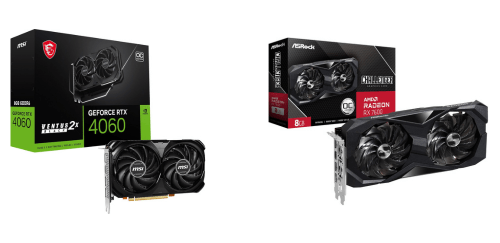
Why Do I Recommend The GeForce RTX 4060?
- The GeForce RTX 4060 features 4th-generation Tensor Cores for AI-accelerated DLSS 3 frame generation that significantly boosts frame rates in supported games, while the Radeon RX 7600 uses shader-based upscaling without dedicated AI hardware.
- The GeForce RTX 4060 supports DLSS 3 with Frame Generation to deliver smoother gameplay and higher perceived performance at 1080p and 1440p, whereas the Radeon RX 7600 relies on FSR without hardware-based frame generation.
- The GeForce RTX 4060 comes with 3rd-generation RT Cores for more efficient real-time ray tracing and better lighting accuracy, while the Radeon RX 7600 uses older-generation ray accelerators with lower ray tracing efficiency.
- The GeForce RTX 4060 has a lower total board power of around 115 W for reduced heat output and easier cooling in compact systems, whereas the Radeon RX 7600 operates at a significantly higher power draw.
- The GeForce RTX 4060 includes dual NVENC encoders with AV1 support for faster video rendering and smoother high-quality streaming, while the Radeon RX 7600 comes with a single AV1 encoder.
- The GeForce RTX 4060 features a large 24 MB L2 cache to improve memory efficiency and performance stability in bandwidth-limited scenarios, whereas the Radeon RX 7600 relies more heavily on Infinity Cache and raw bandwidth.
- The GeForce RTX 4060 supports NVIDIA Reflex to reduce system latency for more responsive competitive gaming, whereas the Radeon RX 7600 uses driver-level latency reduction technologies.
- The GeForce RTX 4060 supports CUDA acceleration for broader compatibility with professional and creative software workloads, while the Radeon RX 7600 uses non-CUDA compute frameworks with more limited application support.
Maybe the Radeon RX 7600 price can make you comfortable because it’s a little bit cheaper than the GeForce RTX 4060. But you have to compromise all the above-mentioned features. Now the Decision is Yours. I hope it was helpful to choose the right one.
Side By Side Comparison
| Feature | GeForce RTX 4060 | Radeon RX 7600 |
| GPU Architecture | Ada Lovelace | RDNA 3 |
| Manufacturing Node | TSMC 4N | TSMC 6nm |
| Shader Count | 3,072 CUDA cores | 2,048 Stream Processors |
| Ray Tracing Units | 24 RT Cores | 32 Ray Accelerators |
| AI / Matrix Units | 96 Tensor Cores | Not available |
| Base Clock | ~1.83 GHz | ~1.72 GHz |
| Video Encoder | Dual NVENC | Single AV1 encoder |
| Upscaling Tech | DLSS 3 + Frame Gen | FSR 2 / FSR 3 |
| Latency Tech | NVIDIA Reflex | Anti-Lag / Anti-Lag+ |
| API Optimization | CUDA-focused | DirectX-focused |
| Driver Stack | Studio + Game Ready | Adrenalin |
| Launch Positioning | Efficiency-focused | Raster-focused |
| Price | Check RTX 4060 Price | Check RX 7600 Price |
What Common Both Can Do?
- GPU Category: Both graphics cards are positioned in the mid-range desktop segment, targeting mainstream gamers and general PC users. This category balances price, power consumption, and performance for the majority of modern workloads.
- Release Era: Both models belong to the same general GPU generation timeframe. This ensures long-term driver support, modern feature sets, and compatibility with current games and applications.
- Manufacturing Foundry: Both GPUs are produced using TSMC fabrication processes. This contributes to reliable silicon quality, efficiency improvements, and consistent manufacturing standards.
- Memory Type: Each card uses GDDR6 memory, which is well suited for gaming and content creation workloads. GDDR6 provides a strong balance of bandwidth, power efficiency, and cost.
- Memory Capacity: Both GPUs include 8 GB of VRAM, making them suitable for modern games at 1080p and many titles at 1440p. This capacity also supports light content creation and multitasking workloads.
- Memory Bus Width: Both use a 128-bit memory bus, which defines how data moves between the GPU and memory. This shared bus width places similar limits on raw memory throughput.
- PCIe Standard: Both cards support PCIe 4.0, enabling fast communication with modern CPUs and chipsets. This ensures full compatibility with current gaming and productivity platforms.
- Slot Requirement: Each GPU typically occupies two expansion slots. This allows compatibility with most standard ATX and micro-ATX PC cases.
- External Power Required: Both GPUs require supplemental power from the power supply. This is standard for performance-oriented graphics cards beyond entry-level designs.
- Power Connector Type: Each card uses a standard 8-pin power connector. This simplifies PSU compatibility and avoids the need for specialized adapters.
- Hardware Ray Tracing: Both GPUs include dedicated ray tracing hardware. This allows real-time lighting, reflections, and shadows in supported games and applications.
- AV1 Video Encoding: Both graphics cards support AV1 hardware encoding. This is important for modern streaming and video compression with improved efficiency.
- AV1 Video Decoding: Each GPU can decode AV1 video streams in hardware. This reduces CPU load during video playback and improves power efficiency.
- DirectX Support: Both GPUs support DirectX 12 Ultimate. This ensures access to modern rendering features used by current and upcoming PC games.
- Vulkan Support: Both cards support the Vulkan graphics API. Vulkan provides efficient low-level access for games and professional applications across platforms.
- HDMI Output: Each GPU supports HDMI 2.1, enabling high refresh rates and resolutions on modern displays. This is important for gaming monitors and TVs.
- DisplayPort Output: Both cards include DisplayPort 1.4a support. This allows high-resolution and high-refresh-rate display configurations.
- Target Resolution: Both GPUs are designed primarily for 1080p and entry-level 1440p gaming. This makes them suitable for high-refresh esports and mainstream AAA gaming setups.
Common Features
| Feature | GeForce RTX 4060 | Radeon RX 7600 |
| GPU Category | Mid-range desktop GPU | Mid-range desktop GPU |
| Release Era | Current generation | Current generation |
| Manufacturing Foundry | TSMC | TSMC |
| Memory Type | GDDR6 | GDDR6 |
| Memory Capacity | 8 GB | 8 GB |
| Memory Bus Width | 128-bit | 128-bit |
| PCIe Standard | PCIe 4.0 | PCIe 4.0 |
| Slot Requirement | Dual-slot | Dual-slot |
| External Power Required | Yes | Yes |
| Power Connector Type | 8-pin | 8-pin |
| Hardware Ray Tracing | Yes | Yes |
| AV1 Video Encoding | Yes | Yes |
| AV1 Video Decoding | Yes | Yes |
| DirectX Support | DirectX 12 Ultimate | DirectX 12 Ultimate |
| Vulkan Support | Yes | Yes |
| HDMI Output | HDMI 2.1 | HDMI 2.1 |
| DisplayPort Output | DisplayPort 1.4a | DisplayPort 1.4a |
| Target Resolution | 1080p–1440p | 1080p–1440p |
| Price | Check RTX 4060 Price | Check RX 7600 Price |