Skylight Calendar & Dragon Touch share many similarities, but there are also important differences, such as quality, performance, features, design, and connectivity. If you want the best one between them, I Would recommend the Skylight Calendar rather than the Dragon Touch.
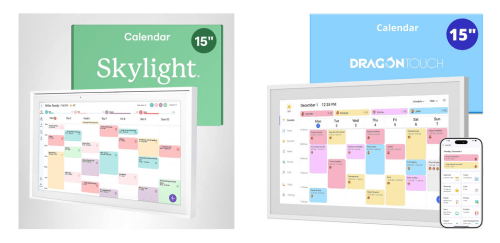
Why Do I Recommend The Skylight Calendar?
- The Skylight Calendar has built-in chore management to help families assign and track household responsibilities in one shared place, while Dragon Touch uses a basic calendar display without chore tracking.
- Skylight Calendar features multi-user profiles for personalized schedules and accountability across family members, whereas Dragon Touch uses a single-user setup that limits individualized planning.
- It includes meal planning tools to help households organize dinners and grocery routines more efficiently, while Dragon Touch has no meal planning functionality.
- The Skylight Calendar supports advanced admin controls to prevent accidental changes and maintain schedule accuracy, whereas Dragon Touch lacks administrator-level permissions.
- Skylight Calendar comes with a dedicated mobile companion app for full remote control and real-time updates, while Dragon Touch uses limited app functionality for basic content management.
- It supports day, week, and month calendar views to improve visibility of short-term and long-term plans, whereas Dragon Touch primarily uses a simplified monthly layout.
- The Skylight Calendar includes a family invitation system to easily onboard household members and sync their calendars automatically, while Dragon Touch does not support structured family invitations.
- Skylight Calendar features a purpose-built family dashboard for centralized scheduling and coordination, while the Dragon Touch uses a general digital frame interface.
Maybe the Dragon Touch price can make you comfortable because it’s a little bit cheaper than the Skylight Calendar. But you have to compromise all the above-mentioned features. Now the Decision is Yours. I hope it was helpful to choose the right one.
Side By Side Comparison
| Feature | Skylight Calendar | Dragon Touch |
| Core Use Case | Family scheduling | Photo display |
| Subscription Required | Yes | No |
| Calendar Engine | Native proprietary | Android-based |
| Chore Management | Supported | Not supported |
| Task Lists | Supported | Not supported |
| Meal Planning | Supported | Not supported |
| User Profiles | Multiple | Single |
| Admin Controls | Yes | No |
| Event Color Coding | Advanced | Basic |
| Calendar Views | Day / Week / Month | Month only |
| Mobile App Sync | Full-featured app | Limited app |
| Cloud Dependency | High | Moderate |
| Offline Mode | Restricted | Basic |
| Photo Frame Priority | Secondary | Primary |
| UI Complexity | Advanced | Simple |
| Device Lock Mode | Supported | Not supported |
| Orientation Auto-Rotate | Yes | Limited |
| Family Invitation System | Yes | No |
| Third-Party App Support | No | Limited Android apps |
| Price | Check Skylight Calendar Price | Check Dragon Touch Price |
What Common Both Can Do?
- Touchscreen Display: Both devices feature a touchscreen interface, allowing users to interact directly with calendars and on-screen content. This makes navigation intuitive and accessible for users of all ages.
- Wall-Mount Support: Each device supports wall mounting, enabling it to function as a central household display. This placement helps ensure schedules and information remain visible throughout the day.
- Wi-Fi Connectivity: Both devices connect to Wi-Fi, allowing them to sync data and receive updates. Reliable connectivity is essential for keeping calendars accurate and up to date.
- Cloud Sync: Each model uses cloud synchronization to keep calendar data consistent across devices. This ensures changes made remotely are reflected on the display.
- Calendar Display: Both products are capable of showing calendar information on screen. This allows users to view schedules at a glance without opening a phone or computer.
- Google Calendar Sync: Skylight Calendar and Dragon Touch both support Google Calendar integration. This compatibility makes them easy to incorporate into existing digital workflows.
- Shared Calendar Viewing: Each device allows multiple events from shared calendars to be displayed together. This is important for coordinating schedules among family members or groups.
- Multiple Calendars: Both can display more than one calendar source. This helps users manage personal, family, and work schedules in one place.
- Photo Display Mode: Each device includes a photo display or slideshow mode. This allows the screen to serve as both an organizational tool and a decorative display.
- Automatic Updates: Both products receive software updates automatically when connected to Wi-Fi. This helps maintain performance, compatibility, and security over time.
- Remote Management: Both devices can be managed remotely through connected apps or cloud accounts. This enables users to update content without being physically near the display.
- Portrait Orientation: Each supports portrait orientation, making them suitable for vertical wall mounting. This orientation works well for viewing daily schedules.
- Landscape Orientation: Both devices can operate in landscape mode. This flexibility allows users to choose the layout that best fits their space.
- Date & Time Display: Both products continuously display the current date and time. This makes them useful as everyday reference displays in shared spaces.
- Event Scheduling: Each device supports event scheduling and display. This ensures upcoming commitments are clearly visible to everyone who relies on the calendar.
- Always-On Display Mode: Both devices are designed to stay on continuously. This ensures information is always visible without requiring manual activation.
Common Features
| Feature | Skylight Calendar | Dragon Touch |
| Touchscreen Display | Yes | Yes |
| Wall-Mount Support | Yes | Yes |
| Wi-Fi Connectivity | Yes | Yes |
| Cloud Sync | Yes | Yes |
| Calendar Display | Yes | Yes |
| Google Calendar Sync | Yes | Yes |
| Shared Calendar Viewing | Yes | Yes |
| Multiple Calendars | Yes | Yes |
| Photo Display Mode | Yes | Yes |
| Automatic Updates | Yes | Yes |
| Remote Management | Yes | Yes |
| Portrait Orientation | Yes | Yes |
| Landscape Orientation | Yes | Yes |
| Date & Time Display | Yes | Yes |
| Event Scheduling | Yes | Yes |
| Always-On Display Mode | Yes | Yes |
| Price | Check Skylight Calendar Price | Check Dragon Touch Price |