Sonos Beam Gen 2 & Sonos Beam Gen 1 share many similarities, but there are also important differences, such as quality, performance, features, design, and connectivity. If you want the best one between them, I Would recommend the Sonos Beam Gen 2 rather than the Sonos Beam Gen 1.
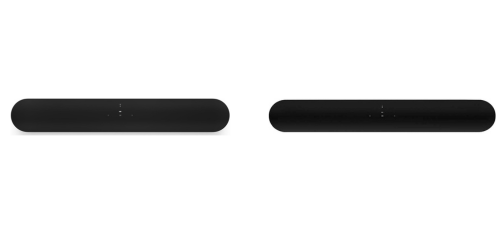
Why Do I Recommend The Sonos Beam Gen 2?
- The Sonos Beam Gen 2 supports Dolby Atmos for creating a more immersive and spacious movie soundstage with virtual height effects, while Sonos Beam Gen 1 does not support Dolby Atmos.
- Sonos Beam Gen 2 comes with HDMI eARC support for handling higher-bandwidth audio formats and improved lip-sync accuracy with modern TVs, whereas Sonos Beam Gen 1 uses HDMI ARC only.
- It features a newer audio processor for smoother Dolby Atmos decoding and more advanced surround virtualization, while Sonos Beam Gen 1 uses an older processing platform.
- The Sonos Beam Gen 2 includes Dolby Digital Plus compatibility for receiving Atmos audio from streaming apps on supported TVs, while the Sonos Beam Gen 1 lacks Dolby Digital Plus support.
- Sonos Beam Gen 2 has an updated grille and internal acoustic design for cleaner high-frequency dispersion and reduced distortion at higher volumes, whereas Sonos Beam Gen 1 uses the original cloth grille design.
- It supports virtual height channel simulation for improved spatial positioning of effects in movies and shows, while Sonos Beam Gen 1 relies on standard left, center, and right channel playback.
- The Sonos Beam Gen 2 features improved hardware headroom for future audio processing updates and format support, while the Sonos Beam Gen 1 is more limited by its older hardware.
- Sonos Beam Gen 2 delivers better integration with newer TVs and streaming devices through eARC-based audio handling, whereas Sonos Beam Gen 1 is constrained by ARC-level bandwidth and compatibility.
Maybe the Sonos Beam Gen 1 can make you comfortable because it’s a little bit cheaper than the Sonos Beam Gen 2. But you have to compromise all the above-mentioned features. Now the Decision is Yours. I hope it was helpful to choose the right one.
Side-by-Side Comparison
| Feature | Sonos Beam Gen 2 | Sonos Beam Gen 1 |
| Dolby Atmos | Yes | No |
| HDMI audio return | eARC / ARC | ARC |
| Dolby Digital Plus (DD+) | Yes | No |
| Atmos delivery formats | Dolby Digital Plus, Dolby MAT | N/A |
| Supported surround ceiling | Virtual height enabled | No height virtualization |
| Audio processing headroom | Newer DSP/CPU platform | Older DSP/CPU platform |
| System-on-chip class | Newer quad-core class | Older generation class |
| Front grille material | Perforated polycarbonate | Acoustic cloth |
| Industrial design details | Updated grille + refined enclosure | Original cloth-wrapped look |
| Depth (front-to-back) | Slightly deeper | Slightly shallower |
| Weight | Slightly heavier | Slightly lighter |
| Lip-sync handling over HDMI | eARC lip-sync capability | ARC lip-sync only |
| TV passthrough bandwidth | Higher | Lower |
| Future audio feature headroom | Higher | Lower |
| HDMI cable/adapter scenario | eARC-capable port | ARC-only port |
| Price | Check Beam Gen 2 Price | Check Beam Gen 1 Price |
What Common Both Can Do?
- Soundbar form factor: Both models use a compact, all-in-one soundbar design intended to sit neatly under a TV or mount on a wall. This makes them suitable for living rooms, bedrooms, and apartments where space efficiency matters.
- Channel configuration: Each soundbar uses a 3.0 channel layout with left, right, and center channels. This configuration prioritizes clear dialogue while still providing stereo separation for music and effects.
- Built-in speakers: Both soundbars include five internal drivers arranged to handle different frequency ranges. This shared driver count ensures a balanced output without needing external speakers.
- Class-D amplifiers: Each model uses five Class-D digital amplifiers matched to its drivers. This amplifier type is efficient, compact, and helps control heat while delivering consistent power.
- Center channel for dialogue: Both include a dedicated center channel. This improves speech clarity in movies, TV shows, and sports broadcasts, especially at lower volumes.
- HDMI TV connection: Both connect to televisions using HDMI for audio return. This allows a single-cable setup and seamless integration with modern TVs.
- Optical audio support (adapter): Each model supports optical audio via an adapter. This is important for compatibility with older TVs that lack HDMI audio return.
- Wi-Fi connectivity: Both soundbars connect to home networks over Wi-Fi. This enables streaming, multi-room playback, and app-based control without relying on Bluetooth.
- Ethernet port: Each includes a wired Ethernet port for direct network connections. This is useful in environments where Wi-Fi stability is a concern.
- Apple AirPlay 2: Both models support AirPlay 2. This allows easy streaming from Apple devices and synchronization with other AirPlay-compatible speakers.
- Voice control support: Both support voice assistants when enabled. This allows hands-free control for playback, volume adjustments, and smart home commands.
- Far-field microphones: Each soundbar uses far-field microphones designed to pick up voice commands from across the room. This ensures reliable voice recognition even during playback.
- Sonos app control: Both are controlled through the Sonos app. The app centralizes setup, tuning, streaming services, and system management.
- Trueplay room tuning: Each model supports Trueplay tuning on compatible devices. This feature adjusts the sound output based on room acoustics for more accurate playback.
- Multi-room audio: Both soundbars integrate into Sonos multi-room systems. This allows synchronized music playback across multiple rooms or independent control per room.
- Surround expansion support: Each can be expanded with compatible Sonos rear speakers. This allows users to build a full surround system over time.
- Subwoofer pairing support: Both support pairing with Sonos subwoofers. Adding a subwoofer enhances low-frequency performance for movies and music.
- TV remote control via HDMI-CEC: Both models work with TV remotes through HDMI-CEC. This reduces the need for extra remotes and simplifies daily use.
- Capacitive touch controls: Each includes touch-sensitive controls on the top panel. These controls provide quick access to volume and playback functions.
- Music streaming services: Both support a wide range of integrated music streaming services. This allows direct playback without needing an external device connected to the TV.
Common Features
| Feature | Sonos Beam Gen 2 | Sonos Beam Gen 1 |
| Soundbar form factor | Yes | Yes |
| Channel configuration | 3.0 | 3.0 |
| Built-in speakers | 5 drivers | 5 drivers |
| Class-D amplifiers | 5 | 5 |
| Center channel for dialogue | Yes | Yes |
| HDMI TV connection | Yes | Yes |
| Optical audio support (adapter) | Yes | Yes |
| Wi-Fi connectivity | Yes | Yes |
| Ethernet port | Yes | Yes |
| Apple AirPlay 2 | Yes | Yes |
| Voice control support | Yes | Yes |
| Far-field microphones | Yes | Yes |
| Sonos app control | Yes | Yes |
| Trueplay room tuning | Yes | Yes |
| Multi-room audio | Yes | Yes |
| Surround expansion support | Yes | Yes |
| Subwoofer pairing support | Yes | Yes |
| TV remote control via HDMI-CEC | Yes | Yes |
| Capacitive touch controls | Yes | Yes |
| Music streaming services | Yes | Yes |
| Price | Check Beam Gen 2 Price | Check Beam Gen 1 Price |
FAQ
Does Sonos Beam Gen 2 sound better than Sonos Beam Gen 1 for movies? Can Sonos Beam Gen 1 be upgraded to support Dolby Atmos through software? Do both Sonos Beam Gen 2 and Gen 1 work with the same TVs? Is HDMI eARC required to use Sonos Beam Gen 2? Can both soundbars be used as part of a surround sound system? Do both models support voice assistants? Is dialogue clarity similar on both models? Do Sonos Beam Gen 2 and Gen 1 support Apple AirPlay 2? Are the physical dimensions similar between the two models? Can both soundbars be controlled with a TV remote? Do both models use the same Sonos mobile app? Is Trueplay room tuning available on both soundbars? Are music streaming features the same on both models? Does Sonos Beam Gen 2 replace Sonos Beam Gen 1 completely? Is Sonos Beam Gen 1 still a good choice today? |